From Version Checks to Interactive Updates: The DepLens Gradle Version Plugin
Checking for Gradle dependency updates can involve several files: dependency declarations, a version catalog, plugin versions and the Gradle wrapper. In a multi-module build, a shared version or BOM can also affect several modules at once.
DepLens is a Gradle dependency update plugin built around an interactive update workflow: check available versions, choose the updates you want in the terminal and apply the selected changes to supported version declarations. You can work through library, BOM, plugin and wrapper updates in one session, with a shared choice for dependencies that use the same version source.
That makes the interactive task useful for a focused maintenance change: select the versions you want to evaluate, leave the others at Current and apply your selection when ready. Separate check tasks provide reports without editing files, including for CI. This guide covers both workflows, along with installation, update policies and version catalogs.
Install the DepLens Gradle dependency update plugin
DepLens 0.1.0 requires Gradle 8.8 or newer and Java 21 or newer. Add the settings plugin to settings.gradle.kts:
plugins {
    id("com.sneedit.deplens.settings") version "0.1.0"
}
For a project using Groovy DSL, add this to settings.gradle instead:
plugins {
    id 'com.sneedit.deplens.settings' version '0.1.0'
}
Check for Gradle dependency updates
Run the check from your project’s root directory:
./gradlew depLensCheckThe report covers dependencies, BOMs and platforms, version constraints, Gradle plugins and the wrapper. The check leaves your source files unchanged and writes a JSON report to build/reports/deplens/depLensCheck.json.
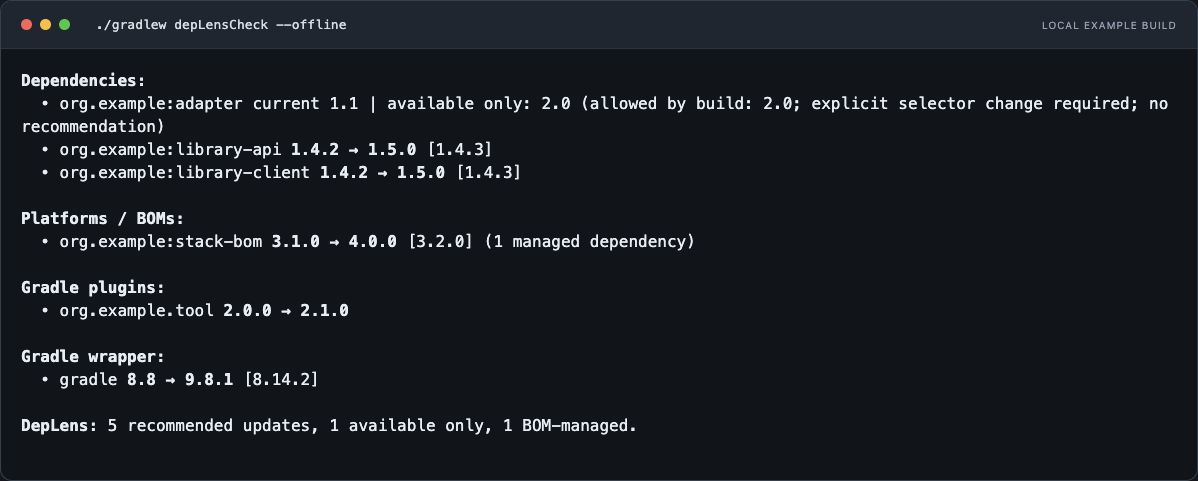
The terminal screenshots use fixed demo versions to illustrate the workflow. They are actual DepLens output, rather than a list of the latest available releases.
For a more focused check, choose the task that matches the change you are planning:
| Task | When to use it |
|---|---|
depLensCheck |
Get an overview of dependency, plugin and wrapper updates together. |
depLensCheckDependencies |
Review library, BOM/platform and version-constraint updates during dependency maintenance. |
depLensCheckPlugins |
Check Gradle plugin versions before a build-tooling update. |
depLensCheckGradle |
Look for Gradle wrapper updates. |
For example, check just the libraries and their platforms:
./gradlew depLensCheckDependenciesEach check prints its results and writes a JSON report under build/reports/deplens/, named after the task. None of these check tasks edits source files.
Two related tasks cover the steps before and after checking: depLensInventory lists the current declarations, resolved versions and source locations, while depLensInteractiveUpdate runs the checks and lets you select versions to apply. The interactive workflow is explained later in this guide.
Control candidate validation with checkBuildContext
Finding a newer release and checking whether it fits a dependency graph are separate steps. The checkBuildContext setting controls whether DepLens performs the additional dependency-graph checks for candidate versions. Configure it in your root build.gradle.kts.
checkBuildContext.set(true): evaluate candidates against the build
depLens {
    checkBuildContext.set(true)
}
true is the default, so this block is optional. DepLens discovers newer versions, applies your update rules and then evaluates dependency candidates in the context of the build’s resolution requirements.
That includes checking candidate Java and variant requirements and their interactions with other dependencies, BOMs and constraints. For example, a newer library might require a Java version your project does not target. Another candidate might conflict with a constraint or be affected by the platform that manages your dependency versions.
The report distinguishes recommended candidates from versions that are available but may require other changes. A newer release can remain visible even when an older candidate is recommended for the current build context. This helps you decide whether to take the smaller update or investigate the requirements blocking the newer one.
Use this setting when selecting updates for a maintenance change. The extra resolution work can take longer than version discovery alone, but gives you more information before editing version declarations.
These checks validate dependency resolution. They do not establish that every artifact can be downloaded, compile your application or run its tests. After applying updates, review the diff and run your normal build and test suite.
checkBuildContext.set(false): discover candidates without graph validation
depLens {
    checkBuildContext.set(false)
}
With false, DepLens still discovers candidate versions and applies your configured policies: allowed update levels, pinned components, ignored versions and prerelease rules remain active. Plugin and wrapper update discovery also remain available.
What it skips is candidate dependency-graph validation. It does not check whether a candidate’s Java or variant requirements fit your project, or whether it works with the other dependencies, BOMs and constraints in that graph. Results are marked build context not checked.
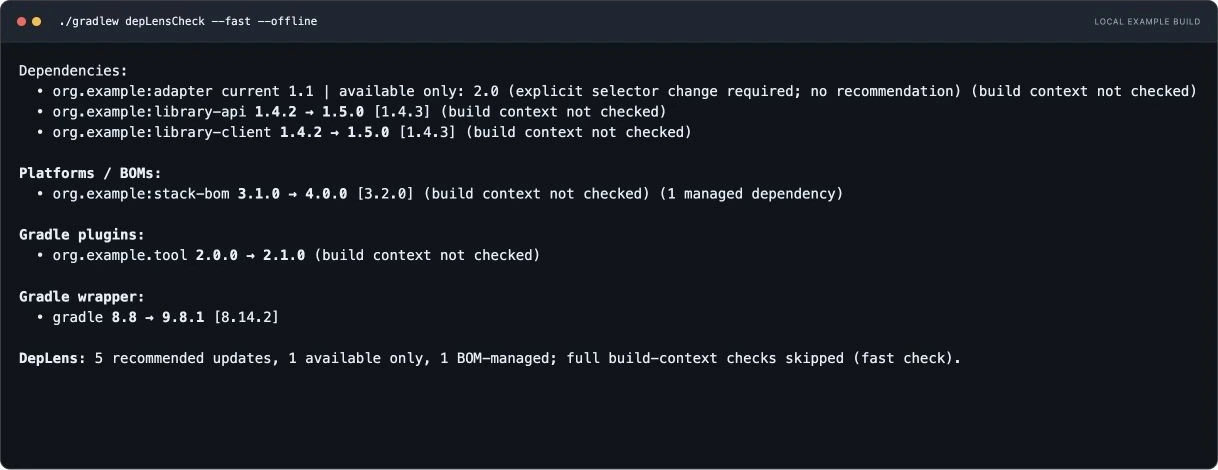
--fast option. The report labels the affected results and confirms that full build-context checks were skipped.For example, a library release requiring a newer Java version can appear as a rule-allowed candidate in this mode. That result tells you the release passed the configured version policy; it does not establish that your current build can resolve it.
Use false for an initial inventory of possible upgrades, especially when you want to scope a larger maintenance effort before spending time on candidate resolution. The setting persists in the build script: subsequent checks continue to skip candidate graph validation until you change it back to true.
| Setting | Version discovery and update rules | Candidate dependency-graph validation |
|---|---|---|
checkBuildContext.set(true) |
Applied | Enabled; the default |
checkBuildContext.set(false) |
Applied | Skipped; results marked build context not checked |
After changing the setting, use the same check command:
./gradlew depLensCheckFor more detail about source locations and failure reasons, add --info.
For a single fast run, ./gradlew depLensCheck --fast skips candidate graph validation for that invocation, including the included builds checked by the task. It leaves the saved configuration unchanged. A stored checkBuildContext.set(false) also stays active when you omit --fast; enable checkBuildContext again to restore graph validation for that configuration.
Configure updates for the way your team works
The following examples cover different maintenance tasks in a Java or Kotlin project. Each depLens block is a separate starting point for your root build.gradle.kts; choose the policies that fit your build rather than pasting every block together. The dependency versions shown below are illustrative starting versions, not recommendations for the latest release.
Keep routine maintenance separate from wrapper upgrades
A team might want library updates during regular maintenance while handling Gradle upgrades in a separate change. Allow minor library updates, keep plugin updates to patches and pin the wrapper:
depLens {
    dependencies {
        allowedUpdates.set("minor")
        includePreReleases.set(false)
    }
    plugins {
        allowedUpdates.set("patch")
    }
    gradle {
        pinCurrentVersion.set(true)
    }
}
For a dependency at 1.4.2, a minor policy allows candidates such as 1.4.3 and 1.5.0, while excluding 2.0.0. Pinning the wrapper keeps it at its current version. Neither policy guarantees that the selected library or plugin will be compatible with your application.
Give test libraries a different update policy
Suppose production dependencies should stay on their current minor release, but the team is prepared to evaluate larger Mockito upgrades. Start with a patch-only policy and override that one dependency:
depLens {
    dependencies {
        allowedUpdates.set("patch")
    }
    rules {
        dependency("org.mockito:mockito-core") {
            allowedUpdates.set("major")
        }
        group("org.junit.jupiter") {
            allowedUpdates.set("minor")
        }
    }
}
This gives Mockito and the exact org.junit.jupiter group their own policies. The group rule does not cover other JUnit groups such as org.junit.platform. If your JUnit versions come from a BOM, configure the platform instead, as shown below.
Hold one library steady and skip a rejected candidate
A logging change may need a dedicated test cycle. Meanwhile, a particular Mockito release might have failed your project’s own tests. These are different situations: pin the first component and exclude only the rejected version of the second.
depLens {
    dependencies {
        allowedUpdates.set("minor")
    }
    rules {
        dependency("ch.qos.logback:logback-classic") {
            pinned.set(true)
        }
        dependency("org.mockito:mockito-core") {
            ignoredVersions.set(listOf("5.14.2"))
        }
    }
}
The Mockito version here is an example of a project-specific exclusion, not a claim that the release is faulty. Other permitted Mockito candidates remain eligible. Remove the pin or exclusion when the reason for it has been resolved.
Keep a shared version catalog entry together
A Java project can give JUnit API and engine dependencies one version in gradle/libs.versions.toml:
[versions]
junit = "5.11.4"

[libraries]
junit-api = { module = "org.junit.jupiter:junit-jupiter-api", version.ref = "junit" }
junit-engine = { module = "org.junit.jupiter:junit-jupiter-engine", version.ref = "junit" }
Reference those aliases from build.gradle.kts and restrict their updates to patches:
dependencies {
    testImplementation(libs.junit.api)
    testRuntimeOnly(libs.junit.engine)
}

depLens {
    rules {
        group("org.junit.jupiter") {
            allowedUpdates.set("patch")
        }
    }
}
During interactive updates, the shared junit value receives one choice for both consumers. DepLens checks their allowed candidates together before offering an edit. A pinned or unchecked consumer can make that shared source read-only; hiding a row from the report does not remove this relationship.
To inspect where your current versions come from before selecting updates, run:
./gradlew depLensInventory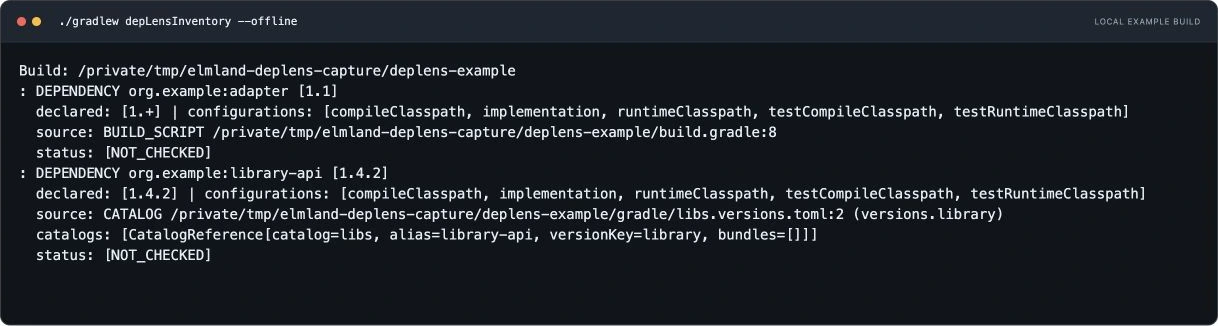
adapter comes from a build script, while library-api points to a version-catalog entry. NOT_CHECKED means this task collected the inventory without checking for newer versions.Update a test BOM as a unit
For a project that already uses a JUnit BOM, maintain the platform version and leave its managed dependencies versionless:
dependencies {
    testImplementation(platform("org.junit:junit-bom:5.11.4"))
    testImplementation("org.junit.jupiter:junit-jupiter-api")
    testRuntimeOnly("org.junit.jupiter:junit-jupiter-engine")
}

depLens {
    rules {
        platform("org.junit:junit-bom") {
            allowedUpdates.set("patch")
        }
    }
}
This is an alternative to the explicit shared catalog version above. The update entry belongs to the BOM. Its managed dependencies follow that version, so the workflow does not add individual version numbers to those declarations.
Evaluate prereleases for one dependency
A trial upgrade does not have to enable prereleases throughout the project. To evaluate a prerelease of the JUnit aggregate dependency while keeping the general policy stable-only:
depLens {
    dependencies {
        allowedUpdates.set("minor")
        includePreReleases.set(false)
    }
    rules {
        dependency("org.junit.jupiter:junit-jupiter") {
            allowedUpdates.set("major")
            includePreReleases.set(true)
        }
    }
}
This example assumes junit-jupiter has an explicit version. It permits prerelease candidates for that dependency; it does not force their selection or override a BOM’s constraints. Use it on a branch where you can evaluate the resulting build and test changes.
Normalize version strings for consistent comparisons
Some libraries use unconventional version labels or change their naming scheme between releases. A change in separators or suffixes can make it difficult to compare candidates consistently, even when the releases belong to the same version line.
DepLens lets you normalize version strings within a dependency-specific rule. Set versionNormalizationPattern to a regular expression matching the part you want to adjust, and versionNormalizationReplacement to its replacement. Configure both options together. DepLens uses the resulting comparison keys to order versions while retaining the original strings for repository requests, reports and source edits.
Prerelease detection is configured separately through preReleasePattern. If a library uses a custom milestone suffix, this pattern can identify it as a prerelease; includePreReleases then controls whether those candidates are allowed. The separate versionPattern option controls major, minor and patch classification.
Example: ApacheDS milestone versions. ApacheDS moved from labels such as 2.0.0-M24 to 2.0.0.AM25. A normalization rule can express both styles using the same -M prefix for comparison, while a prerelease pattern recognizes both original suffixes:
dependencies {
    testImplementation("org.apache.directory.server:apacheds-core-api:2.0.0-M24")
}

depLens {
    dependencies {
        includePreReleases.set(false)
    }
    rules {
        dependency("org.apache.directory.server:apacheds-core-api") {
            versionNormalizationPattern.set("[.]AM(?=[0-9]+$)")
            versionNormalizationReplacement.set("-M")
            preReleasePattern.set("(?i)[.-](?:AM|M)[0-9]+$")
            includePreReleases.set(true)
            allowedUpdates.set("major")
        }
    }
}
The normalization rule replaces a trailing .AM milestone prefix with -M to create a comparison key. That gives the milestone numbers a consistent format:
| Original version | Comparison key |
|---|---|
2.0.0-M24 |
2.0.0-M24 |
2.0.0.AM25 |
2.0.0-M25 |
2.0.0.AM26 |
2.0.0-M26 |
The prerelease pattern recognizes both naming styles, and includePreReleases explicitly allows them for this dependency. The major policy permits candidates across update levels; it does not force an upgrade. Other dependencies keep the stable-only policy from the surrounding configuration.
If you select 2.0.0.AM25, DepLens requests and writes 2.0.0.AM25; the normalized 2.0.0-M25 value stays a comparison key. This allows the naming adjustment without changing which artifact is resolved. Candidates still go through the enabled build-context checks before being recommended.
Focus an investigation on the application runtime
When investigating runtime dependencies in a larger build, narrow the checked configurations explicitly:
depLens {
    checkIncludedBuilds.set(false)
    checkBuildSrc.set(false)
    checkResolvableConfigurationFilter {
        includes.set(listOf("runtimeClasspath"))
    }
    outputDeclaredConfigurationFilter {
        excludes.set(listOf("testImplementation", "testRuntimeOnly"))
    }
}
The analysis filter selects resolvable configurations named runtimeClasspath. The output filter hides declarations from the listed test configurations. Those settings serve different purposes: hiding a declaration does not skip its checks or suppress a CI failure.
This intentionally limits the investigation and excludes included builds and buildSrc. Remove the scope restrictions when returning to a broader maintenance check. Configuration filters use regular expressions matched against the whole configuration name.
Apply Gradle dependency updates interactively
On macOS or Linux, start an interactive update session:
./gradlew depLensInteractiveUpdateThe screen recording below shows how to navigate dependency rows and choose versions in the interactive update view.
Use the up and down arrows to move between version sources and the left and right arrows to choose a version. You can also:
- Press
rto select the highest offered versions accepted by the checks for each shared source. - Press
cto reset the selection to the current versions. - Press Enter to apply the selected changes.
- Press Escape to cancel without editing files.
When several dependencies share a version-catalog value, they get a single shared choice. Supported edits include literal versions in catalogs, Gradle properties, build scripts and wrapper distribution URLs. Computed or ambiguous version sources remain read-only.
After applying changes, review the diff and run the build:
git diff
./gradlew build
DepLens does not run your build or tests after editing and does not automatically roll back the changes.
Make dependency updates actionable in CI
A scheduled maintenance job can fail when library updates are found while still reporting plugin and wrapper updates for later review:
depLens {
    failIfChecksIncomplete.set(true)
    dependencies {
        allowedUpdates.set("minor")
        failIfUpdatesFound.set(true)
    }
    plugins {
        failIfUpdatesFound.set(false)
    }
    gradle {
        failIfUpdatesFound.set(false)
    }
}
Run the non-interactive task in the job:
./gradlew depLensCheckThe dependency flag also counts available-only candidates, so a failing check does not necessarily mean there is an update you can apply unchanged. failIfChecksIncomplete makes missing or failed checks visible instead of treating an incomplete result as a clean report.
Keep build/reports/deplens/depLensCheck.json as a CI artifact, including when the command fails. Reports are written before failure. In a normal pull-request build, you may prefer leaving failIfUpdatesFound disabled so an unrelated code change is not blocked by a newly published dependency.
DepLens documentation and examples
DepLens is open source under Apache 2.0. The GitHub repository includes installation instructions and example builds. For more detailed policies and options, see the configuration guide and behavior reference.